Call Forward
Directs incoming calls for the extension
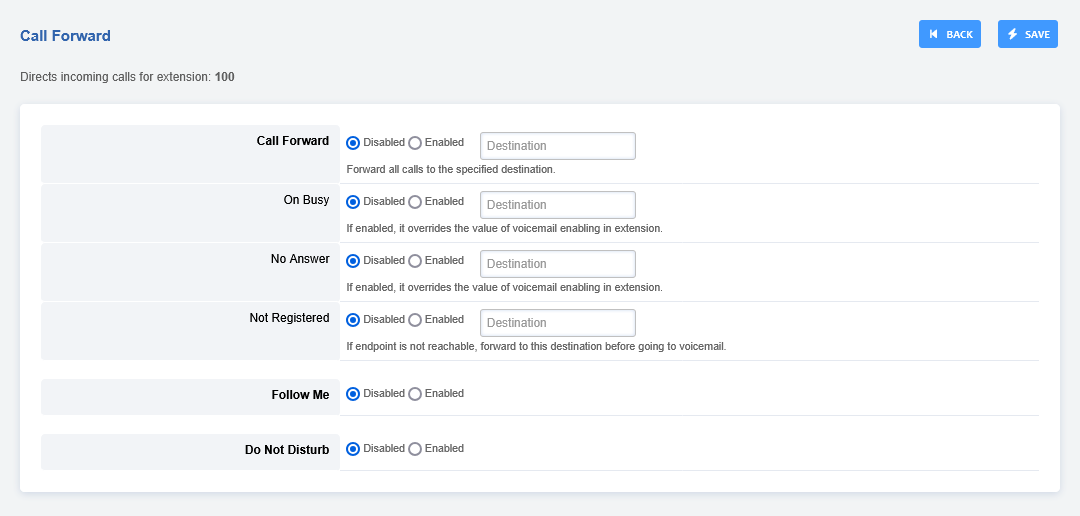
To access call routing goto Accounts > click the edit pencil icon on the right of the extension

Click CALL FORWARD on the top right
Call Forward and Do No Disturb
This will allow phones to sync CFWD and DND over SIP.
A few things need to be configured to enable this feature and restart freeswitch:
Uncomment this line in lua.conf.xml.
<hook event="PHONE_FEATURE_SUBSCRIBE" subclass="" script="app.lua feature_event"/>
Add to Default Settings:
    Category = device
    Subcategory = feature_sync
    Type = boolean
    Value = true
Enable Feature Sync on the Device
Yealink
Web Interface -> Features -> General Information -> Feature Key Synchronization set to Enabled
Config Files -> features.feature_key_sync.enable
Might be addition settings needed for the latest firmware. I tested with 81.0.110
FusionPBX Default Settings -> Provision -> yealink_feature_key_sync
Polycom
reg.{$row.line_number}.serverFeatureControl.cf=“1”
reg.{$row.line_number}.serverFeatureControl.dnd=“1”
FusionPBX Default Settings -> Provision -> polycom_feature_key_sync
Cisco SPA
<Feature_Key_Sync_1_ group=“Ext_1/Call_Feature_Settings”>Yes</Feature_Key_Sync_1_>
FusionPBX Default Settings -> Provision -> spa_feature_key_sync
Grandstream GXP and GRP
Web Interface -> Accounts -> Account X -> SIP Settings -> Advanced Features -> Feature Key Synchronization
Config file P2325
FusionPBX Default Settings -> Provision -> grandstream_feature_key_sync